AI-powered search engines are changing the rules of online visibility faster than any algorithm update from the past decade. WordPress GEO Optimization is the practice of structuring a WordPress site so that AI engines can read, understand, and cite it in their generated responses. ChatGPT and Perplexity are relevant examples, as are Gemini and Google AI Overviews. If your site doesn’t appear in these responses, you’re losing visibility to competitors who have already implemented this strategy.
Key Takeaways
- WordPress GEO optimization differs from traditional SEO: the goal isn’t just to rank on Google, but to be the source that AI engines cite in their generated responses.
- WordPress is one of the most flexible platforms for GEO, thanks to access to theme files and plugins. Custom structured data completes this advantage.
- Proper configuration of the robots.txt file and schema markup data are the fundamental technical steps for visibility in AI engines.
- Structured and clear content significantly increases the chances that an AI engine will cite your page instead of a competitor’s page. Information accuracy remains essential.
- Neogenio offers free SEO and GEO audits at seo.neogenio.ai, so you can quickly identify optimization gaps on your site.
By the end of this guide, you’ll know exactly what technical steps to apply and what plugins to install. You’ll learn how to evaluate your site’s current state from the perspective of visibility in AI engines.
What is GEO and why it matters for your WordPress site
Generative Engine Optimization (GEO) is the discipline through which a website is optimized to be cited by AI engines, not just indexed by Google. Engines like ChatGPT and Perplexity don’t return a list of links. Google AI Overviews work similarly: they generate direct answers and select sources they consider credible and clear.
WordPress powers over 40% of all existing websites. Yet the vast majority of these sites remain invisible in AI-generated responses. The reason is simple: they’re built on outdated SEO tactics that don’t communicate effectively with information extraction systems in generative engines.
The practical difference is clear: a GEO-optimized site is the source that AI cites. An unoptimized site is simply ignored, regardless of how many years of classic SEO it has behind it. This means traffic and authority shift to better-prepared competitors. Conversions follow the same path.
GEO doesn’t replace SEO. It complements it. The correct strategy combines both, but prioritizes information structure and factual clarity over purely technical optimizations aimed at traditional crawlers.
In the short term, the absence of a GEO strategy means missing citation opportunities. In the medium term, it means losing brand authority in the minds of users who get answers directly from AI interfaces, without ever reaching your site.
WordPress GEO Optimization vs. traditional SEO: essential differences
Traditional SEO optimizes a site to appear in Google’s organic results through factors like domain authority and backlinks. Keyword density also plays a role. WordPress GEO Optimization pursues a different goal: to become the source cited in an AI engine’s generated response, not just a page in the top 10.
| Criterion | Traditional SEO | WordPress GEO Optimization |
|---|---|---|
| Main goal | Ranking in SERP | Citation in AI responses |
| Key factor | Domain authority and backlinks | Information clarity and structure |
| Content format | Pages optimized for keywords | Direct and factual answers |
| Technical data | Meta tags and XML sitemap | Schema markup and robots.txt for AI bots |
| Success measurement | Position in Google | Frequency of citations in AI Overviews |
One aspect many site owners ignore: high ranking in Google doesn’t guarantee citation by AI. A generative engine may cite a page from position 15 if it offers a clearer and better-structured answer than pages in the top 3.
This changes the logic of content investment. It’s no longer just about how many keywords a page contains. It matters how directly and accurately it answers the user’s question. Vague content or content overloaded with surface-level optimizations is disadvantaged compared to factual and well-organized content.
WordPress has a structural advantage over other CMS platforms in this regard: full access to theme files and hooks in functions.php. A directory of over 70,000 plugins allows exact configuration of elements that generative engines need to extract information accurately.
Structured data and schema markup: the foundation of AI visibility
Schema markup is code that explains to AI engines what a page contains, not just what words it uses. Without structured data, a generative engine must interpret the content on its own. Misinterpretations mean your page isn’t cited or is cited incorrectly.
The most relevant schema types for WordPress GEO optimization include Article and FAQPage. HowTo and Product complete the list, while Organization adds context about brand identity. Each of these conveys specific context to AI engines that makes content easier to extract and cite.
FAQPage schema is particularly effective. Generative engines process questions and direct answers, exactly the format this schema declares. A page with well-implemented FAQ schema has significantly higher chances of being cited in ChatGPT or Perplexity responses compared to a page with no structured markup.
Article schema conveys publication date and author. The main subject is also communicated. AI engines use this information to evaluate source timeliness and credibility. An article without this data is treated as an anonymous and undated source, which reduces the likelihood of citation.
How to implement schema markup in WordPress
The most direct way to add schema markup to a WordPress site is through specialized plugins, without writing code manually. Plugins like Yoast SEO and Rank Math automatically generate structured markup based on the page’s content type. Schema Pro offers similar functionality.
For FAQ pages, you can add dedicated blocks in the Gutenberg editor that automatically generate FAQPage schema. Rank Math, for example, detects FAQ blocks and applies the correct markup without additional configuration.
Schema markup verification is done with Google Rich Results Test or the Schema Markup Validator tool. Run the test after any major theme or plugin changes, as updates can overwrite or break existing markup.
Configuring robots.txt and AI crawler access
An incorrectly configured robots.txt file can completely block AI crawlers from indexing your site, making any other GEO optimization pointless. This is probably the most common and easiest-to-fix technical blocker in WordPress GEO optimization.
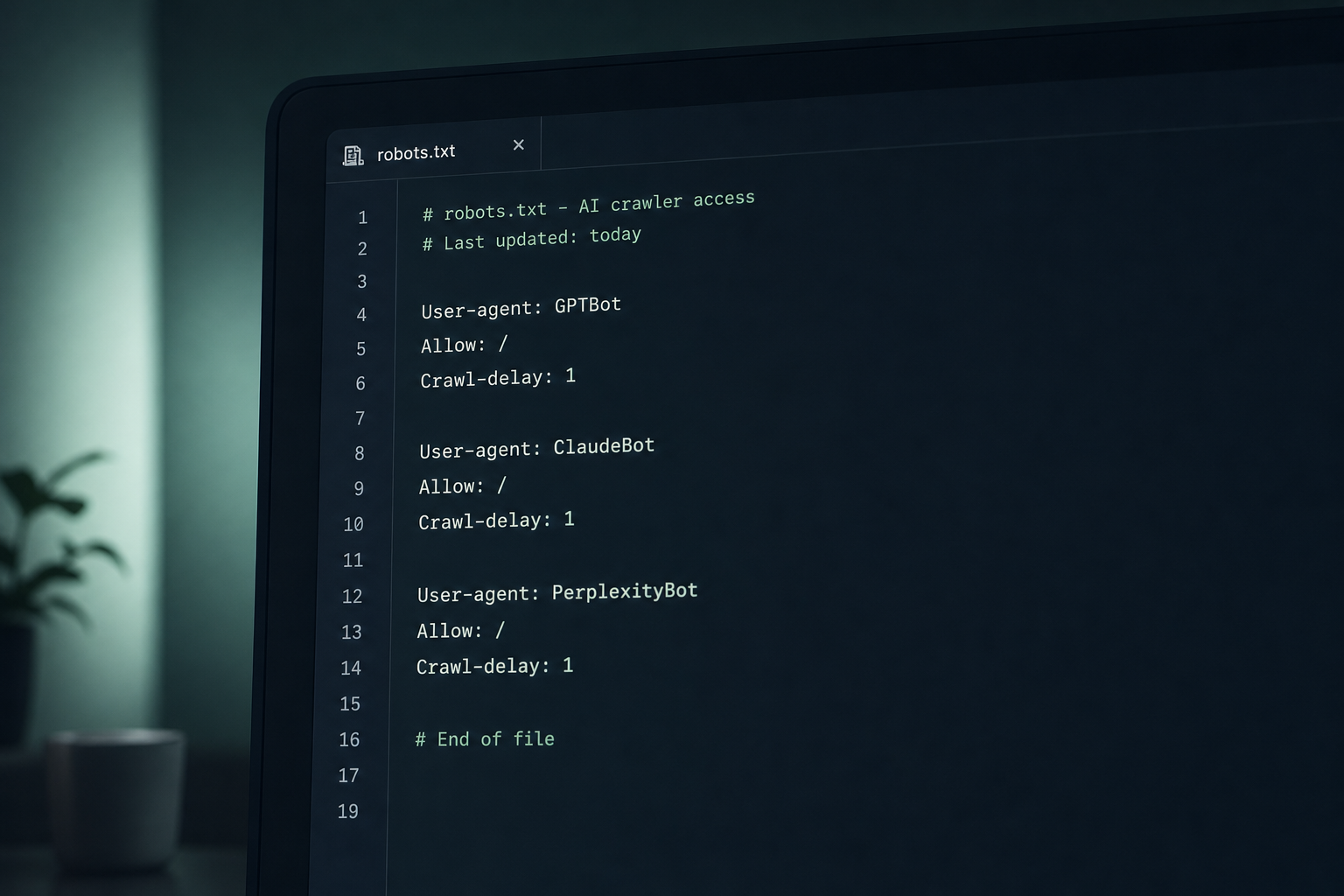
AI crawlers have specific names: GPTBot and OAI-SearchBot belong to OpenAI. ClaudeBot belongs to Anthropic, while PerplexityBot serves the Perplexity engine. If your robots.txt file contains Disallow: / directives for these agents or generic rules that block them, AI engines cannot access your content.
The basic rule is to explicitly add permission for each relevant AI crawler. A silent robots.txt file, with no rules for these agents, leaves the decision to each bot’s default behavior. This behavior can vary. It’s safer to be explicit.
Example robots.txt configuration for AI
A correct configuration includes separate blocks for each AI crawler, with the Allow: / directive. Add these lines to the robots.txt file in your WordPress root directory:
User-agent: GPTBot
Allow: /

User-agent: OAI-SearchBot
Allow: /

User-agent: ClaudeBot
Allow: /

User-agent: PerplexityBot
Allow: /
After configuring robots.txt, speed up indexing by submitting new and updated pages through the IndexNow protocol. ChatGPT Search reads Bing, and IndexNow notifies Bing immediately after publishing, without waiting for organic crawling.
AI crawler access should be verified periodically, especially after major theme updates or server configuration changes. A security plugin or caching rule can reintroduce restrictions without being obvious from the admin panel.
How to write structured content for generative engines
AI engines extract information from content as if answering a user’s direct question. Content that naturally fits this processing method has higher chances of being cited. There are concrete techniques through which you can structure WordPress articles in this way.
The first principle is a direct answer at the beginning. Each section in an article should start with a paragraph that directly answers the section’s title, in clear declarative sentences. Generative engines process text sequentially and give more weight to information at the beginning of a content block.
The second principle is verifiable factuality. Content containing concrete data, such as figures and calendar dates, is treated as more credible by AI extraction systems. Named sources also add credibility. Don’t make claims without context: specify the source and year of any statistic.
Content formats preferred by AI engines
Numbered and bulleted lists are easily extracted by generative engines because they clearly delimit individual elements of an answer. Tables with compared data are also effective, especially for “what’s the difference between X and Y” type questions.
Questions and direct answers, in FAQ format, are among the most cited types of content in AI responses. Structure question sections with H3 titles followed immediately by a short and precise answer paragraph, without unnecessary introductions.
Descriptive titles matter more than in traditional SEO. A vague section title like “More details” doesn’t help an AI engine understand what it’s extracting from that section. A title like “How to configure schema markup in WordPress in 3 steps” provides immediate context and increases the likelihood of citation.
Avoid decorative text. Long sentences that don’t add information dilute useful content. Introductions that repeat what was said before are equally problematic. Generative engines aren’t impressed by volume, but by the density of useful information.
WordPress plugins for GEO optimization
A WordPress plugin dedicated to GEO optimization makes the technical infrastructure easier to manage, especially for sites without a development team available. The category is relatively new, but a few tools have already proven useful in practice.
Established SEO plugins, Yoast SEO and Rank Math, already offer a solid starting point for schema markup and structured data. These are directly relevant to GEO. If you have one of them installed and configured correctly, you’ve covered a significant part of the technical foundation needed.
New plugins dedicated exclusively to GEO
The AI Generative Search Optimizer plugin, available free in the WordPress.org directory, is built specifically for optimizing visibility in AI engines like Google SGE and ChatGPT. Bing AI is also covered. It generates structured data oriented toward citation in AI responses and offers content recommendations adapted to this goal.
The difference from classic SEO plugins is that a GEO plugin optimizes for extraction and citation, not ranking. These two goals aren’t identical and require different configurations at the schema markup and content formatting level.
No plugin can replace editorial judgment. A GEO plugin manages the technical infrastructure, but argument structure and answer clarity remain the author’s responsibility. Information accuracy depends on you. The plugin prepares the ground, but content wins or loses citations.
How to conduct a GEO audit for your WordPress site
A GEO audit identifies exactly what prevents AI engines from extracting and citing your content. Unlike a classic SEO audit, it checks not only technical factors but also the quality of information structure and accessibility for AI-specific crawlers.
The first step is checking your robots.txt file for restrictions that block AI crawlers. The second step is testing schema markup with Rich Results Test. Each important content type should have the corresponding markup, without errors.
The third step is analyzing content structure: how many pages have direct answers at the beginning of sections and how many use FAQ or structured list formats. Also check how many contain factual data with clear sources. This is often the biggest weak point for sites that have invested heavily in traditional SEO but little in editorial clarity.
Tools for GEO audit
Besides Google Rich Results Test and Schema Markup Validator, you can use Google Search Console to check if your pages already appear in AI Overviews. Perplexity and ChatGPT can be used directly. Search for topics your site should be a relevant source for and check if you’re cited.
Neogenio offers a free initial SEO and GEO audit at seo.neogenio.ai. This covers both visibility in Google and visibility in AI engines like ChatGPT, identifying technical and editorial gaps that limit your site’s citation.
A well-done audit isn’t a problem report. It’s a prioritization map. Not all gaps have the same impact. The most valuable to fix first are those that completely block AI crawler access or that lack schema markup on pages with the most potential traffic.
How Neogenio helps you implement WordPress GEO Optimization
Complete implementation of a WordPress GEO optimization strategy requires time and technical expertise. Consistent capacity to produce structured content is equally important. Neogenio covers all these components through an integrated set of AI tools built specifically for WordPress.
The Neogenio SEO and GEO AI engine researches keywords and writes articles optimized in your brand voice. It publishes them directly to WordPress. You approve each publication, so you don’t lose editorial control, but you save execution time. Your first AI-written article is free with a Neogenio subscription.
For those starting from scratch, Neogenio creates a free WordPress website with AI, with pages and text. Images are included. Everything is built on your company’s brand and colors, directly on websites.neogenio.ai. A site created this way starts already structured to be visible in AI engines, not just Google.
Integrated GEO strategy in the publishing workflow
The biggest obstacle in GEO optimization isn’t technical. It’s editorial. Producing consistent structured and factual content requires a well-defined workflow. Clarity is essential. Without a system, sites publish irregularly and with varied structure, which reduces the coherence of signals sent to AI engines.
Neogenio integrates keyword research and article writing into a single automated workflow overseen by an editorial team. Publishing to WordPress is included. This means GEO optimization isn’t a one-time project, but an ongoing process that builds citation authority over time.
Also, Neogenio does web design and online magazines structured to position well from day one, including from the GEO visibility perspective, not just SEO. Site architecture and information hierarchy are planned from the start with generative engines in mind. Content types follow the same logic.
The Neogenio platform works in 6 languages, which means a GEO strategy can be implemented for audiences in multiple markets. Content is optimized natively in each target market’s language.
Frequently asked questions about WordPress GEO optimization
What’s more important for GEO: schema markup or content quality?
Both are necessary and condition each other. Schema markup without clear and factual content won’t generate consistent citations. Excellent content without schema markup risks being misinterpreted by AI engines. The logical order of implementation is: first structured and direct content, then schema markup that describes it correctly.
How long does it take for WordPress GEO optimization to produce visible results?
First citations in AI responses can appear within weeks of correctly implementing technical configuration and publishing structured content. Building consistent citation frequency across multiple AI engines is a process of several months, similar to building authority in traditional SEO.
Do I need a separate GEO plugin if I already have Yoast SEO installed?
Yoast SEO covers part of the schema markup infrastructure needed for GEO. However, plugins dedicated exclusively to GEO add specific functionality for citation in AI engines that aren’t included in Yoast. If your site already generates significant traffic, it’s worth testing a specialized GEO plugin alongside Yoast.
Is GEO optimization relevant for small sites or personal blogs?
Yes, and sometimes more relevant than for large sites. AI engines don’t select sources exclusively by domain authority. They select the clearest and best-structured content for each question. A small blog with direct answers and correct schema markup can be cited more frequently than a large site with vague content.
How do I know if my WordPress site is already being cited by AI engines?
The most direct way is to manually search in ChatGPT and Perplexity for topics your site should be a relevant source for. Google AI Overviews work similarly. Check if you’re mentioned. Alternatively, a dedicated GEO audit, like the free one offered by Neogenio at seo.neogenio.ai, systematically identifies your visibility status in AI engines.
WordPress GEO Optimization isn’t a passing trend. It’s the direction the entire online search industry is moving. If you want to build a WordPress site structured for AI visibility from the first step, you can create a free WordPress website with AI in minutes on Neogenio.
Neogenio AI
The Neogenio blog: practical guides on SEO and GEO AI, web design, eCommerce, AI automation and SaaS apps, for businesses that want to grow online.
All articles by this author → Talk to our team on WhatsApp